JIT-Less Setup & Diagnose
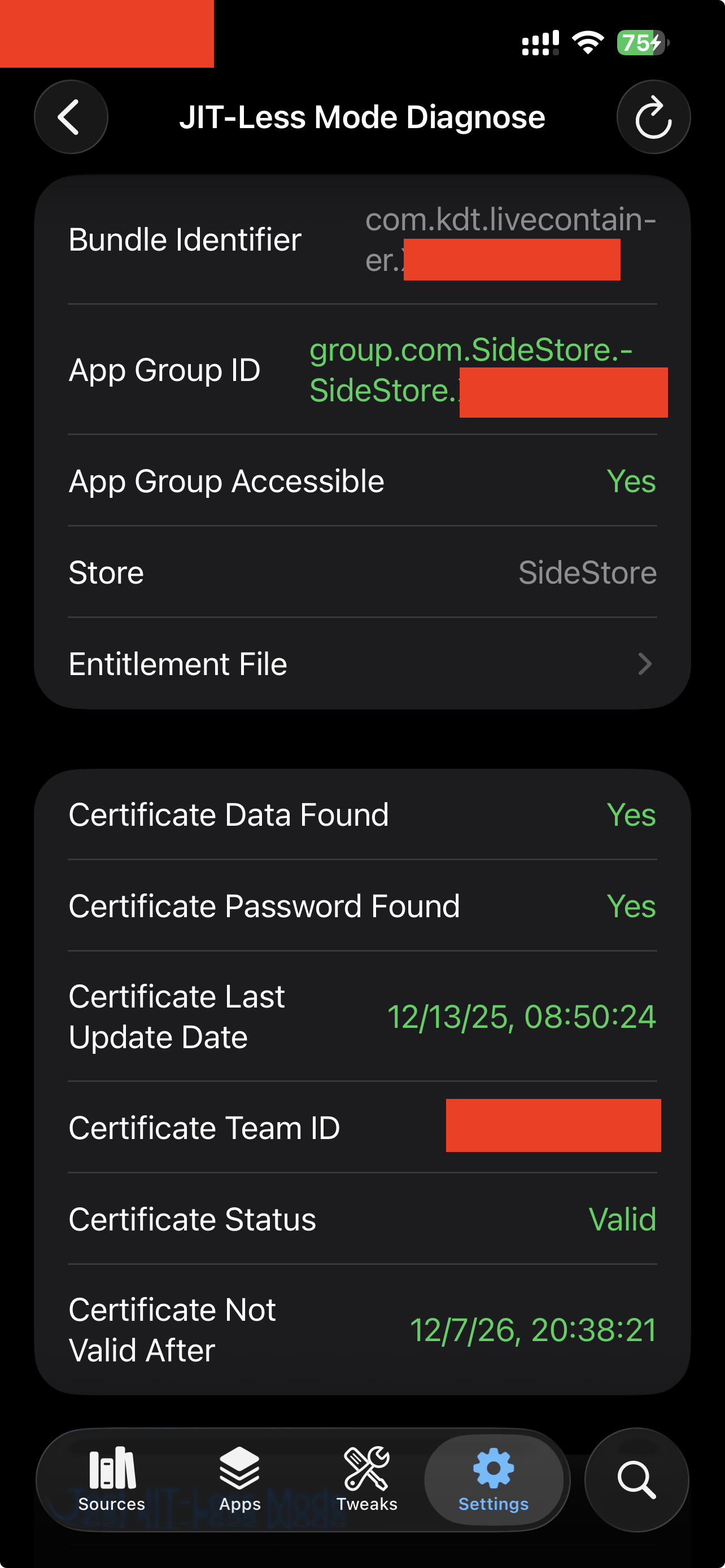
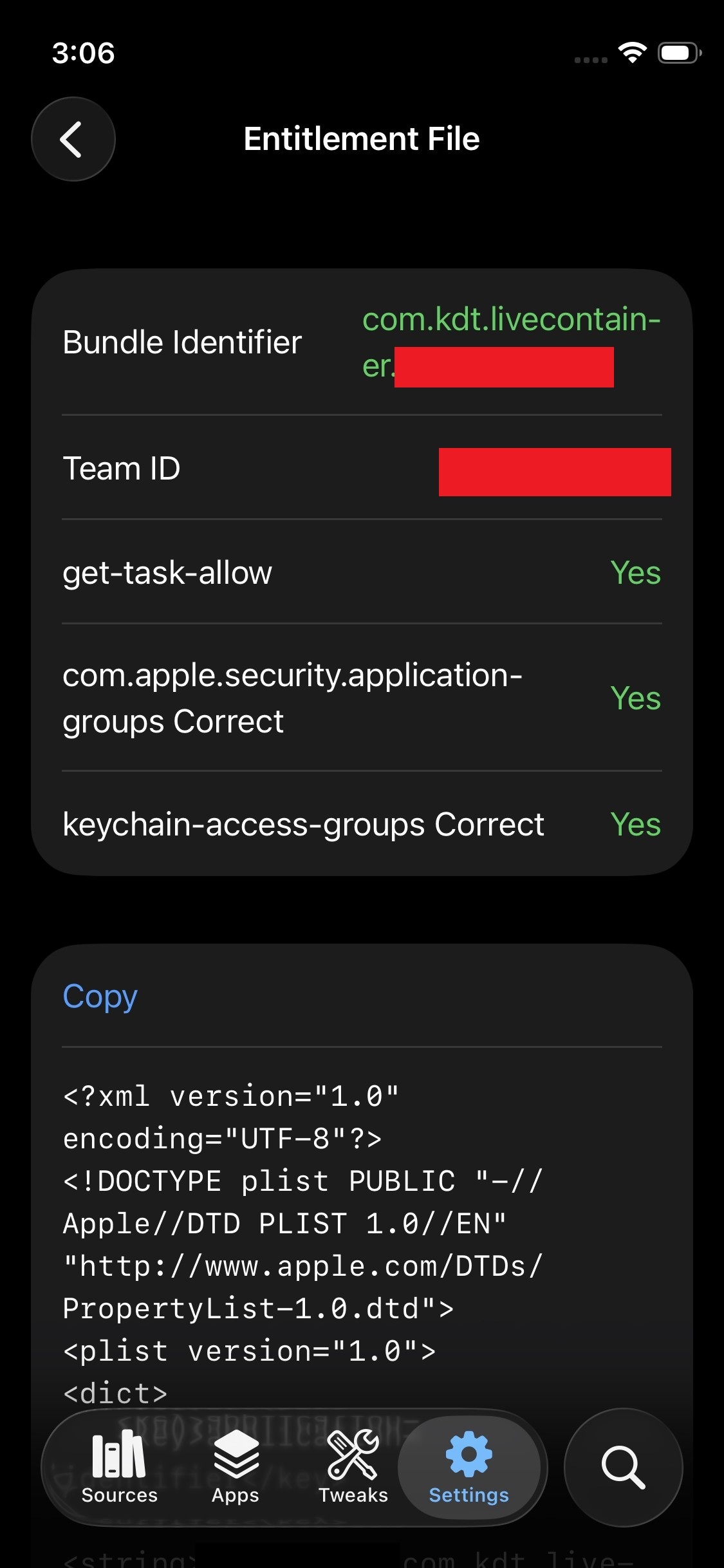
If you successfully setup JIT-Less mode, your JIT-Less Mode Diagnose view and entitlements file should look like the screenshot above. Use this guide when it shows red values or Test JIT-Less Mode fails.
App Group ID / App Group Accessible / Store is red
Causes:
- LiveContainer was signed with no
com.apple.security.application-groups(aka App Groups) entitlement. - LiveContainer was not installed through AltStore/SideStore or Impactor.
- LiveContainer and Store are signed with different Apple accounts (Team ID mismatch).
Fixes:
- Ensure LiveContainer and AltStore/SideStore are signed with the same Apple account.
- Reinstall LiveContainer via AltStore/SideStore and keep required extensions/entitlements (
Use Main Profile/Keep All Extensions). - In Diagnose ->
Entitlement File, verify:get-task-allow = Yes,application-groups Correct = Yes, andkeychain-access-groups Correct = Yes.
Certificate Data Found / Certificate Password Found / Certificate Last Update Date is red
Causes:
- Certificate import was not completed.
Fixes:
- Re-import the certificate in
Settings(file import or import from Store). - Refresh Diagnose.
Certificate Team ID is red
Causes:
- Imported
.p12certificate belongs to a different Apple Developer Team.
Fixes:
- Remove current certificate.
- Re-import a certificate that matches the current LiveContainer signing account.
- If you are using SideStore/AltStore to sign LiveContainer, you need to make sure you've signed into the account that signed LiveContainer
Certificate Status = Revoked/Unknown / Certificate Validate Until = Unknown / Test JIT-Less Mode fails
Causes:
- Certificate is revoked/expired.
Fixes:
- Re-import a valid certificate and ensure password is correct.
- Reopen Store and refresh apps, then return and refresh Diagnose.
- Run
Test JIT-Less Modeagain. - If it still fails please try reinstalling.
- This happens most when SideStore is installed through AltServer. If this issue cannot be fixed, please consider reinstalling SideStore following the new guide.
Entitlements File
You may also directly identify signing issues by checking the entitlement file. A correct entitlement file may look like this:
<?xml version="1.0" encoding="UTF-8"?>
<!DOCTYPE plist PUBLIC "-//Apple//DTD PLIST 1.0//EN" "http://www.apple.com/DTDs/PropertyList-1.0.dtd">
<plist version="1.0">
<dict>
 <key>application-identifier</key>
 <string>A1B2C3D4E5.com.kdt.livecontainer.A1B2C3D4E5</string>             <--- Important!
 <key>com.apple.developer.team-identifier</key>
 <string>A1B2C3D4E5</string>
 <key>com.apple.security.application-groups</key>
 <array>
  <string>group.com.rileytestut.AltStore.A1B2C3D4E5</string>              <--- Important!
  <string>group.com.SideStore.SideStore.A1B2C3D4E5</string>               <--- Important!
 </array>
 <key>get-task-allow</key>
 <true/>
 <key>keychain-access-groups</key>
 <array>
  <string>A1B2C3D4E5.com.kdt.livecontainer.shared</string>
  <string>A1B2C3D4E5.com.kdt.livecontainer.shared.1</string>
  <string>A1B2C3D4E5.com.kdt.livecontainer.shared.2</string>
  ...
  <string>A1B2C3D4E5.com.kdt.livecontainer.shared.127</string>            <--- Important!
 </array>
</dict>
</plist>
- where
A1B2C3D4E5the value ofcom.apple.developer.team-identifier(aka Team ID). - If any item exists under
com.apple.security.application-groups, any app group related checks should pass. - If you don't see
get-task-allow, or it'sfalse, you are using a distribution certificate profile to sign LiveContainer, which is not supported and LiveContainer won't work at all. - If
application-identifierwithout the Team ID prifix does not match LiveContainer's bundle ID, some features like file picker fix will not work. - If there's no 128
keychain-access-groups, thekeychain-access-groups Correctcheck will fail. This happens most when you installed LiveContainer with an old version of iloader, used an unsupported signer, or when you forgot to configure entitlements in your signer.